
Customize Messaging
Your messaging guidance shapes how the AI writes every message in your campaign. Better guidance leads to better messages. This guide covers how to configure each element for maximum impact.
Messaging Guidance Overview
Messaging guidance includes:
- Tone: How formal or casual to be
- Instructions: Specific directions for the AI
- Call-to-Action: What you want leads to do
- Pitch Elements: Pain points, value props, and social proof
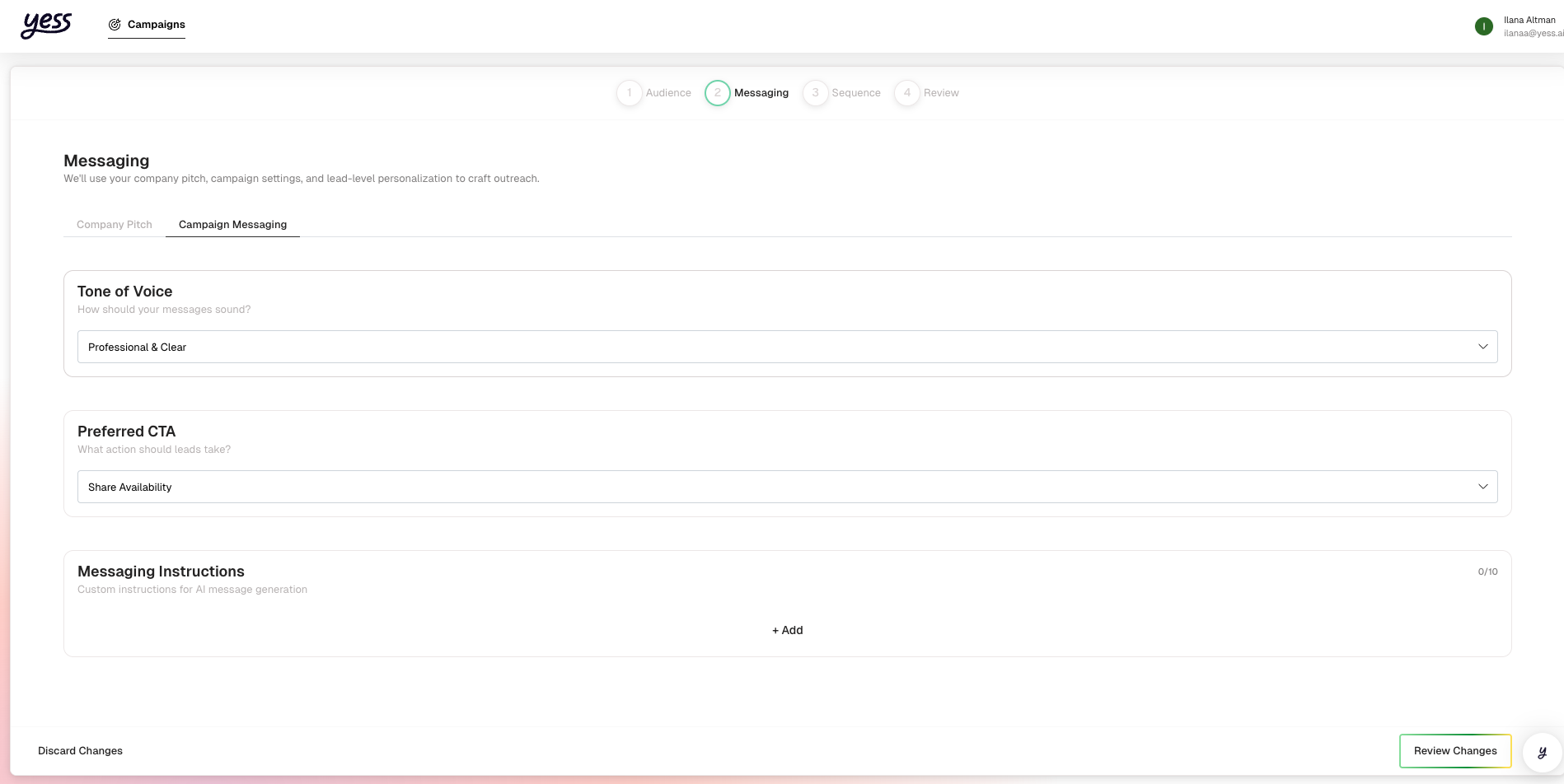
Setting Your Tone
Tone affects the overall feel of your messages:
| Tone | Best For | Example Opening |
|---|---|---|
| Professional | Enterprise, formal industries | "I'm reaching out regarding..." |
| Friendly | SMB, creative industries | "Hope you're having a great week!" |
| Direct | Busy executives, concise cultures | "Quick question about your sales process." |
| Conversational | Peer-to-peer, warm approaches | "Saw your recent post about..." |
Choosing the Right Tone
Consider:
- Your brand voice: Match how your company communicates
- Your audience: Executives may prefer direct; SMB owners may prefer friendly
- Industry norms: Finance tends formal; tech tends casual
When in doubt, start with Professional and adjust based on responses.
Writing Effective Instructions
Instructions tell the AI specifically what to do (and not do). Clear instructions dramatically improve message quality.
What to Include
Do's:
Focus on how we help reduce prospecting time
Mention specific results like "2x response rates"
Reference their recent company news when relevant
Keep messages under 150 words
End with a clear question or call-to-action
Don'ts:
Don't mention competitor names
Don't use phrases like "Hope this email finds you well"
Don't make promises about specific outcomes
Don't use excessive exclamation marks
Example Instructions
Focus on how we help sales teams save 10+ hours/week on prospecting.
Emphasize our Salesforce integration when the lead's company uses Salesforce.
Mention our recent case study with Company X showing 40% more meetings.
Keep messages concise and scannable - under 100 words for first touch.
Use a question in the closing to encourage replies.
Don't mention pricing or competitors.
Instruction Writing Tips
Be Specific
"Mention our 99.9% uptime" is better than "mention reliability."
Give Examples
Show the AI what good looks like with sample phrases.
Set Limits
Specify word counts or what to avoid to keep messages focused.
Prioritize
Put your most important instructions first.
Crafting Your Call-to-Action
Your CTA tells leads exactly what to do next. Make it:
- Clear: No ambiguity about the next step
- Easy: Low commitment for first touch
- Specific: Include details like time commitment
CTA Examples by Funnel Stage
| Stage | CTA Example |
|---|---|
| Cold Outreach | "Open to a 15-minute chat this week?" |
| Warm Lead | "Can I send over a quick demo video?" |
| Follow-up | "Does Thursday at 2pm work for a call?" |
| Final Touch | "Would it make sense to reconnect next quarter?" |
Good vs. Bad CTAs
- "Open to a quick 15-minute call this week?"
- "Would it make sense to chat about this?"
- "Can I send over a 2-minute demo video?"
- "Worth a quick conversation?"
Adding Pitch Elements
Pitch elements give the AI material to work with. The more relevant information you provide, the better the personalization.
Pain Points
What problems does your product solve? Be specific:
Weak:
- "Sales is hard"
- "Companies need more leads"
Strong:
- "Sales teams spend 5+ hours/day on manual prospecting"
- "SDRs waste time on leads that aren't ready to buy"
- "Personalization at scale is impossible without AI"
Value Propositions
What benefits do you deliver? Quantify when possible:
Weak:
- "We help with sales"
- "Better outreach"
Strong:
- "Save 10+ hours per week on prospecting"
- "2x response rates with AI personalization"
- "Book 40% more meetings with the same effort"
Social Proof
What results or credibility can you share?
Types of social proof:
- Customer logos: "Trusted by Salesforce, HubSpot, and 500+ sales teams"
- Results: "Helped Company X increase meetings by 40%"
- Credibility: "Backed by top-tier investors"
- Scale: "Used by 10,000+ sales professionals"
Uploading Knowledge Files
For additional context, upload documents the AI can reference:
Good candidates:
- Product one-pagers
- Case studies
- Competitive battlecards
- Industry reports you've published
- FAQ documents
In the messaging guidance section, find Additional Knowledge.
Click Upload and select your files (PDF, DOC, TXT supported).
Optionally describe what each file contains and when to use it.
The AI uses knowledge files as reference material. It won't copy content directly but will incorporate relevant information into personalized messages.
Updating Messaging for Active Campaigns
You can update messaging guidance even while a campaign is running:
- Go to your campaign
- Click Edit on the messaging section
- Make your changes
- Save
What happens:
- Future messages will use the new guidance
- Already-sent messages aren't affected
- Pending (not yet approved) messages will regenerate
Testing and Iterating
Review Early Messages
With approval mode on:
- Review the first 10-20 messages carefully
- Note what the AI does well and what needs improvement
- Update guidance based on patterns
Common Issues and Fixes
| Issue | Likely Cause | Fix |
|---|---|---|
| Messages too long | No length guidance | Add "Keep under X words" |
| Wrong tone | Tone mismatch | Adjust tone setting or add tone instructions |
| Missing key points | Pitch elements incomplete | Add more specific value props |
| Generic openings | Limited research available | This is normal for some leads |
| Off-topic references | Instructions unclear | Be more specific about what to focus on |
Best Practices
Start Simple
Begin with basic guidance and refine based on what you see.
Be Consistent
Use consistent terminology across all pitch elements.
Update Regularly
Refine guidance based on what messages get responses.
Test Variations
Try different approaches in separate campaigns to see what works.
Related Guides
- Create a Campaign — Setting up messaging during creation
- Review Engagements — Seeing how guidance translates to messages
- AI Personalization — Understanding how AI uses your guidance