
Audiences and Leads
In YESS AI SDR, you define your target audience using criteria, and the system finds and enrolls leads that match. This page explains how targeting works and how leads move through your campaigns.
What is a Lead?
A lead is an individual prospect in your campaign. Each lead represents a real person at a company who matches your targeting criteria.
Every lead has:
- Contact information: Name, email, LinkedIn profile
- Company details: Company name, industry, size
- Role information: Job title, seniority level
- Engagement status: Where they are in your outreach sequence
Defining Your Audience
Your audience is defined by your Ideal Customer Profile (ICP) criteria. The system uses these filters to find matching leads.
ICP Criteria
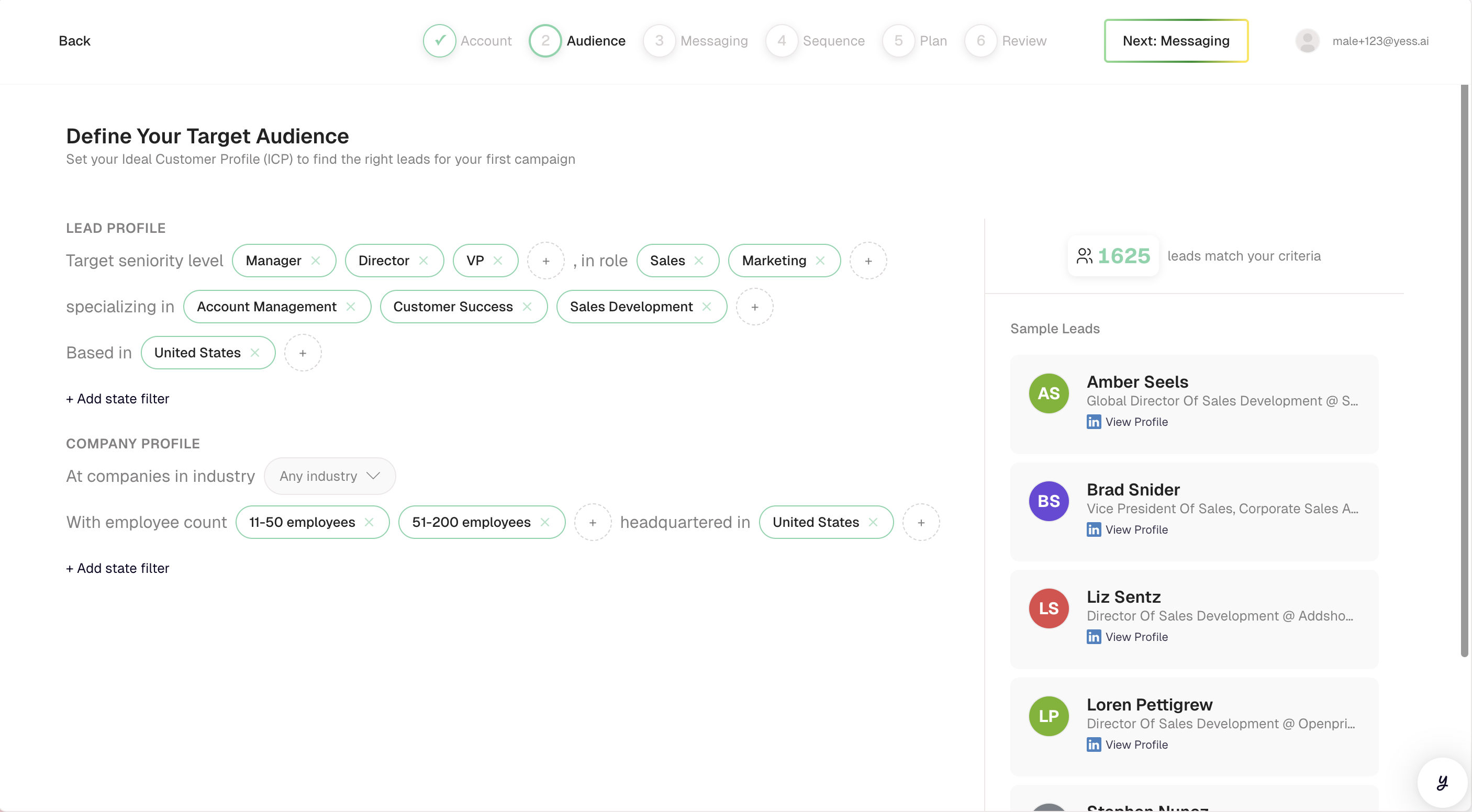
| Criteria | Description | Examples |
|---|---|---|
| Job Titles | Roles you want to reach | VP of Sales, Sales Director, Head of Revenue |
| Seniority | Level in the organization | C-Level, VP, Director, Manager |
| Industries | Business sectors | Software, Healthcare, Financial Services |
| Company Size | Number of employees | 50-200, 201-1000, 1000+ |
| Location | Geographic regions | United States, California, New York |
| Keywords | Specific terms to match | "SaaS", "B2B", "Enterprise" |
How Matching Works
When you set your ICP criteria:
- Search: The system searches for prospects matching your filters
- Preview: You see an estimate of available leads
- Enrollment: After launch, matching leads are added to your campaign
- Deduplication: Leads already in other active campaigns are excluded
The more specific your criteria, the more targeted your outreach. Start narrow and expand if needed.
Lead Enrollment
When your campaign is active, leads are enrolled automatically based on your ICP criteria.
Enrollment Pacing
Leads aren't enrolled all at once. The system paces enrollment at approximately 20 leads per day until your monthly quota is reached.
Why pacing matters:
- Creates natural, non-spammy outreach patterns
- Gives you time to respond to replies
- Spreads engagement evenly across the month
Monthly Quota
Your monthly quota limits how many leads can be enrolled per billing period. This quota is based on your subscription plan.
Example:
- Monthly quota: 500 leads
- Daily enrollment: ~20 leads
- Time to fill quota: ~25 days
Lead Statuses
Once enrolled, each lead has a status showing their progress through your sequence:
| Status | Description |
|---|---|
| In Progress | Lead is actively moving through the sequence |
| Paused | Lead's sequence is temporarily stopped |
| Completed | Lead has finished all steps in the sequence |
| Replied | Lead has responded to your outreach |
| Blocked | Lead cannot be contacted (missing info, opted out, etc.) |
Understanding the Lead Journey
Managing Leads
Viewing Enrolled Leads
From any campaign, click the Leads tab to see all enrolled leads. You can filter leads by:
- Status (in progress, paused, replied, etc.)
- Company
- Search by name or email
Pausing Individual Leads
Need to stop outreach to a specific lead? You can pause them:
- Find the lead in your campaign
- Click the Pause button
- The lead's sequence stops immediately
Pending messages for that lead won't be sent. You can resume anytime.
Resuming Leads
To restart outreach to a paused lead:
- Find the paused lead
- Click Resume
- The sequence continues from where it left off
Bulk Actions
You can perform actions on multiple leads at once:
- Pause All: Stop all in-progress sequences
- Resume All: Restart all paused sequences
- Retry Failed: Attempt to send failed messages again
Lead Information
What the AI Knows About Each Lead
For personalization, the AI accesses:
- Public profile information: Name, title, company, LinkedIn data
- Company information: Industry, size, recent news
- Professional context: Role responsibilities, team structure
What Gets Personalized
Using this information, each message is tailored with:
- References to the lead's specific role
- Company-specific details or news
- Industry-relevant talking points
- Personalized opening lines (icebreakers)
Lead Quality
Ensuring Accurate Data
The system validates lead data before enrollment:
- Email verification: Checks that email addresses are valid
- LinkedIn verification: Confirms LinkedIn profiles exist
- Deduplication: Prevents the same person from being contacted multiple times
Handling Missing Information
If a lead is missing required information:
| Missing Data | What Happens |
|---|---|
| No email | LinkedIn-only outreach (if LinkedIn available) |
| No LinkedIn | Email-only outreach (if email available) |
| Neither | Lead marked as blocked |
Best Practices
Start Specific
Begin with tight criteria to test messaging, then broaden your audience.
Use Multiple Criteria
Combine job titles, industries, and company size for precise targeting.
Monitor Reply Rates
If replies are low, your audience might be too broad or too narrow.
Exclude Current Customers
Make sure your targeting excludes existing customers to avoid awkward outreach.
Related Topics
- Campaigns — How campaigns use audiences
- Engagements — How leads receive outreach
- Manage Leads — Working with enrolled leads