



📓 Try It Yourself
Follow the Quick Start instructions below to run this demo in minutes.
You'll need:
- Temporal CLI installed
- OpenAI API key
- Python 3.8+
📦 Download: durable-agentic-workflows-demo.zip
Section I: Why Agentic Workflows Fail in Production
At Yess, we build AI agents that perform actions in your CRM.
A key challenge is understanding each customer's specific CRM structure. Their unique objects, fields, relationships, and business logic - Which we do using agents.
Our initial CRM agents were highly effective for small datasets. However, as we onboarded enterprise clients...
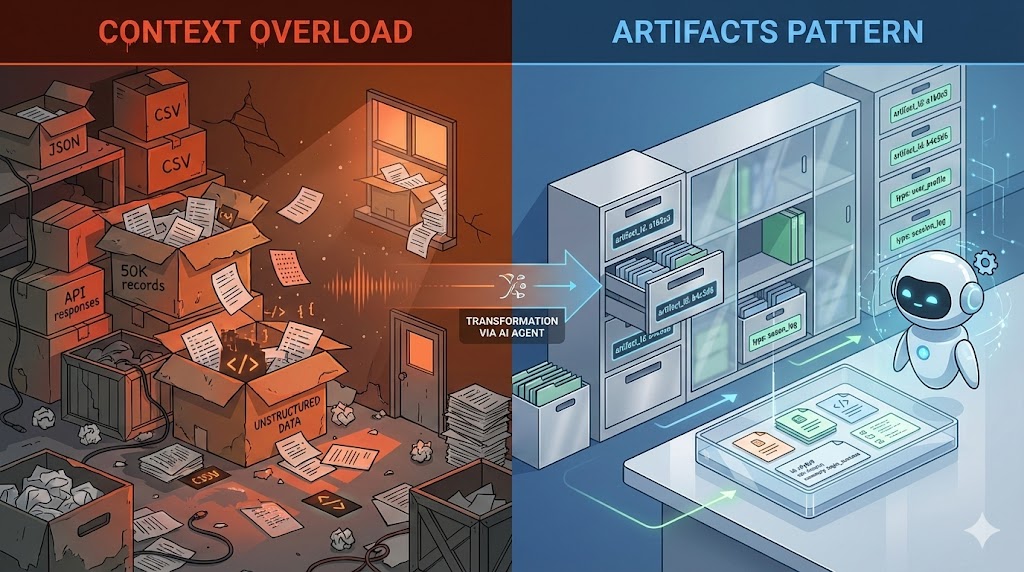
Data volumes exploded. Agentic workflows that took just a few minutes now ran 10, 20, even 45 minutes. More data meant more tool calls - querying CRM APIs, fetching schemas, analyzing records, each one another chance for failure. Each failure meant restarting from scratch, wasting time and money.
❌ The Silent Failure
The workflow completes successfully, but an agent hallucinated something midway through. Everything downstream is poisoned. Restart from scratch.
Section II: What We Needed
We couldn't keep restarting 45-minute workflows. After testing different approaches, we boiled it down to three essential requirements:
1. Durable Execution with Smart Failure Handling
Infrastructure will fail. When it does, minimize what you lose and fail fast when needed.
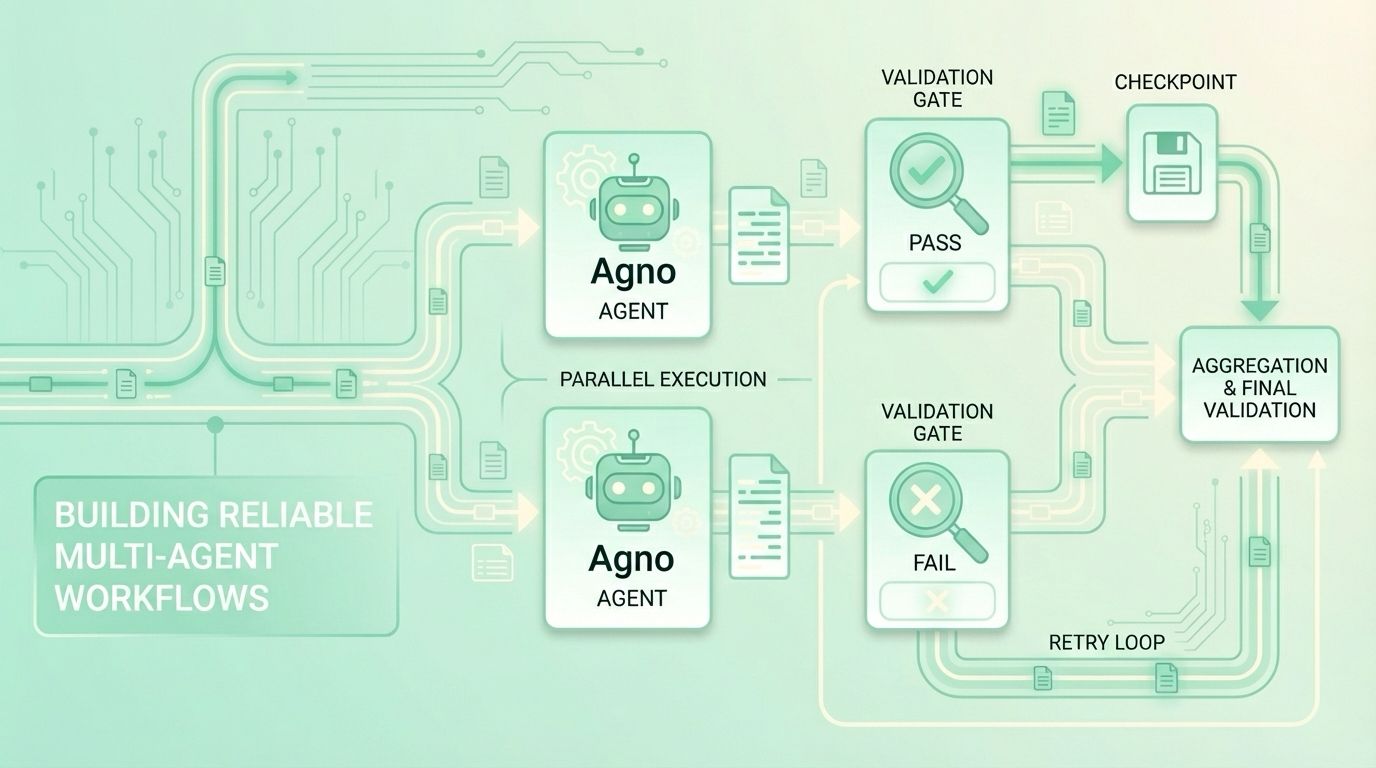
Checkpointing: Save progress after each step. If something breaks, resume from the last checkpoint instead of restarting from scratch.
Timeouts & Retries: Define reasonable completion times and retry limits. When exceeded, fail fast instead of waiting indefinitely.
2. Validation Checkpoints (Catch Issues Early)
An agent finishing isn't enough, we need to verify it did a good job. Validations must be:
- Fast - don't slow down the pipeline
- Early - catch problems before wasting downstream work
- Specific - allow retries on the exact failed step, not the entire workflow
- Informative - semantically analyze outputs and pass validation failure reasons to retries for targeted fixes
3. Stay Optimized
Balance reliability with efficiency - minimize execution time without compromising durability.
The Solution - Task Decomposition
The business case is straightforward: Long-running workflows are expensive to retry and validate. Task decomposition reduces both costs.
Is this solution right for you? Ask yourself:
- Do your workflows run for more than a few minutes?
- Can your workflows be broken into smaller, independent tasks?
- Would a failure halfway through waste significant time and money?
- Do you need to verify intermediate results for quality/correctness?
Answering yes to even one indicates task decomposition could benefit your workflow.
The core principle: Break complex workflows into small, discrete steps with checkpoints between them.
How to approach implementation:
- Identify natural breakpoints in your workflow where you can checkpoint state (e.g., after data fetching, after each analysis phase)
- Define validation criteria for each step's output, what makes it "good enough" to proceed?
- Determine dependencies between steps to identify what can run in parallel
- Set appropriate timeouts for each step based on expected execution time
| Aspect | Before Task Decomposition | After Task Decomposition |
|---|---|---|
| ⚠️ System Failure Impact | ❌ Lose entire workflow (45 min) | ✅ Lose one step (1-8 min) |
| 🔍 Validation Failure Impact | ❌ Re-run entire workflow | ✅ Re-run only failed step |
| 📊 Validation Scope | ❌ Validate 2000+ lines of mixed output | ✅ Validate 200 lines per step |
| ⚡ Optimization | 🐌 Everything runs sequentially | 🚀 Independent steps run in parallel |
Section III: Building the Workflow - A Complete Example
We'll build a simplified CRM analysis workflow that demonstrates all three requirements in action. The workflow analyzes mock CRM data (contacts and opportunities) to extract insights about customers opportunities.
What you'll see:
- Durable execution - checkpointing after each step, automatic resume on failure
- Validation - catching issues before they propagate
- Parallel optimization - running independent analyses concurrently
Workflow Architecture
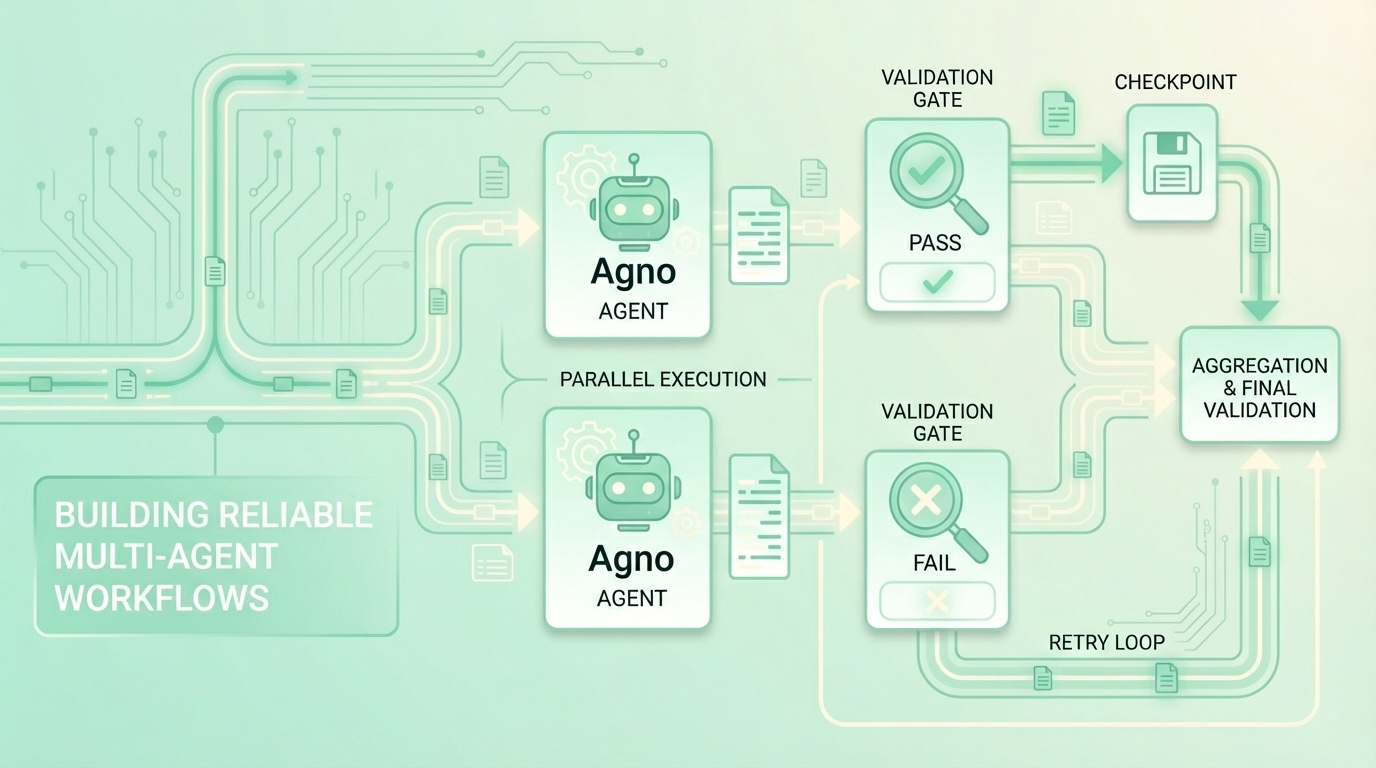
Each box is a checkpoint - if any step fails, Temporal resumes from the last successful checkpoint.
What You Need to Know Before We Begin
| Component | Purpose | Type | Key Features |
|---|---|---|---|
| 🏗️ Temporal | Durable execution engine | Infrastructure (requires install) | • Checkpointing & automatic retries • Timeout policies • Web UI for monitoring |
| 🤖 Agno | AI agent framework | SDK/Library | • Lightweight & fast • Structured outputs with Pydantic • Works with any LLM provider |
| 🔑 OpenAI API | LLM provider | API (key required) | • gpt-4o-mini for cost-effective analysis • Reliable structured JSON outputs |
Prerequisites
Before starting, ensure you have:
- Temporal CLI installed (instructions)
- Python 3.8+ installed
- OpenAI API Key (from platform.openai.com)
Quick Start
Step 1: Start Temporal Server (Terminal 1)
Open a terminal and run:
Keep this terminal open - the server must stay running.
Step 2: Download and Run Workflow (Terminal 2)
Open a new terminal and run:
Watch it live: Open http://localhost:8233 to see the workflow executing in real-time.
Step 1/4: Define the Workflow (workflow.py)
The workflow orchestrates three processing steps with validation between them. See the full code in the repo.
💡 Key Highlights
✓ Parallel execution with
asyncio.gather()- contacts and opportunities analyzed concurrently✓ Checkpointing after each
execute_activity- state persisted automatically✓ Validation gates before final combination - catch issues early
✓ Different timeout policies - analysis gets 2 min, validation gets 30 sec
Step 2/4: Implement Activities (activities.py)
Activities do the actual work - using Agno AI agents to analyze data and validate outputs. See the full code in the repo.
💡 Key Highlights
✓ Structured outputs with Pydantic models - reliable JSON from LLMs
✓ Hybrid validation - deterministic checks first (fast), then AI validation
✓ Fail fast on simple errors - save AI costs by not running expensive checks
✓ Type safety - Pydantic validates response schemas automatically
✓ Retriable - if any activity fails, Temporal retries automatically
Step 3/4: Run the Workflow (run.py)
The runner starts a worker and executes the workflow. See the full code in the repo.
💡 Key Highlights
✓ Worker registers all activities and workflows
✓ Connects to Temporal server on
localhost:7233✓ Workflow ID enables tracking and resumption
✓ Task queue isolates different workflow types
Expected output:
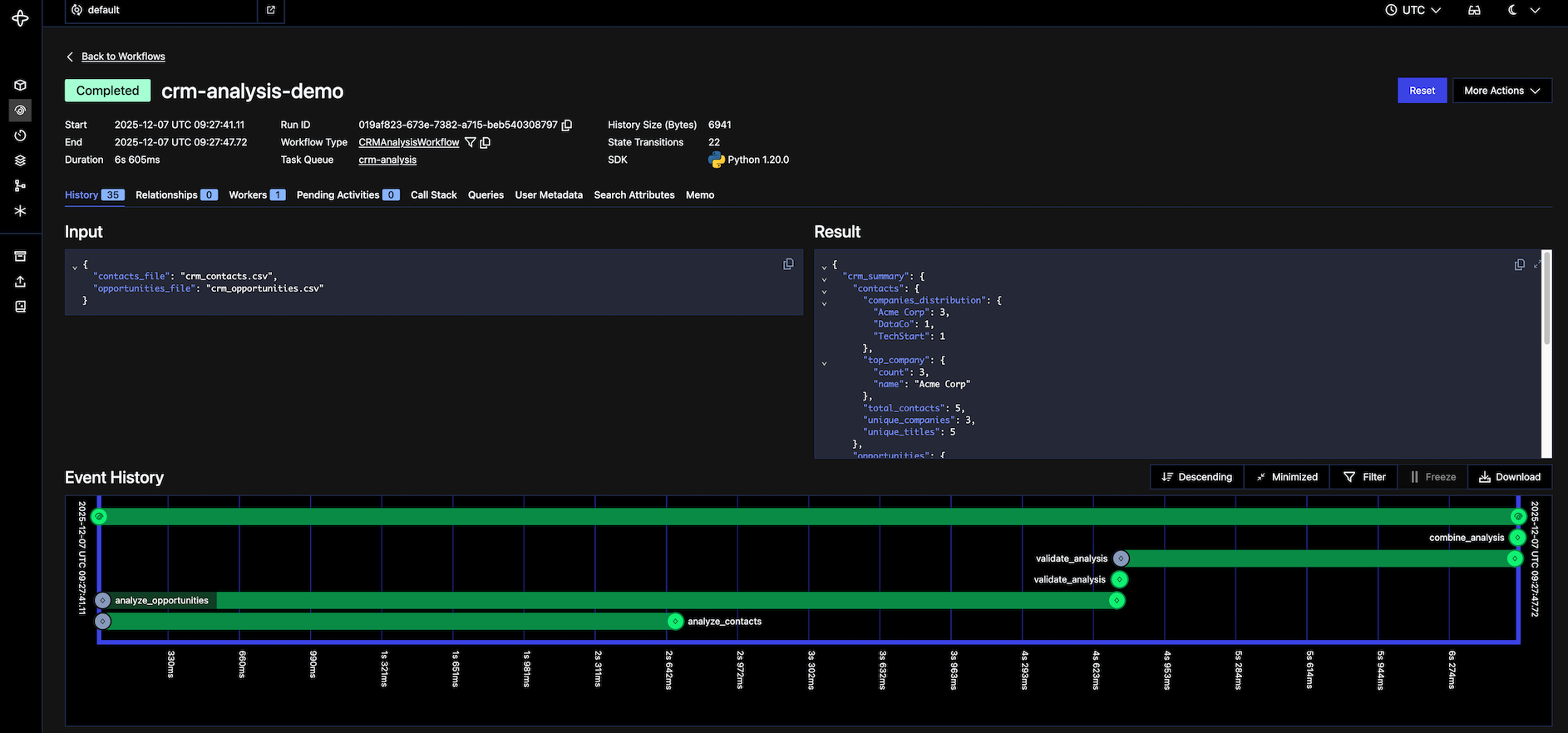
Step 4/4: Explore in Temporal UI
Open http://localhost:8233 in your browser to see the workflow in action.
You'll see:
- Workflows page - your workflow with ID
crm-analysis-demo - Event history - every activity execution, checkpoint, retry in real-time
- Parallel execution - contacts and opportunities start at the same timestamp
- Activity inputs/outputs - full data for debugging
Try breaking it:
| Test | How | What Happens |
|---|---|---|
| Validation failure | Make validate_analysis return {"passed": False} |
Workflow stops early, reports failure reason |
| Infrastructure failure | Kill process mid-workflow (Ctrl+C), then restart | Resumes from last checkpoint, not from scratch |
| Activity retry | Add raise Exception() randomly in an activity |
Temporal automatically retries the failed activity |
Section IV: What You Just Built
✅ Durable execution in action:
- Each activity checkpointed after completion
- Kill the process mid-workflow → restart resumes from last checkpoint
- No repeated work, no lost progress
✅ Hybrid validation catching issues:
- Deterministic checks catch 90% of errors instantly (missing fields, negatives, invalid ranges)
- AI validation catches semantic issues and hallucinations
- Fail fast on simple errors, save AI costs by not running expensive checks unnecessarily
- Clear error messages show exactly what failed
✅ Parallel optimization:
- Contacts and opportunities analyzed concurrently
- Independent operations run simultaneously
- Execution time cut in half
This is the exact pattern we use in production - same structure, same checkpointing, same validation gates. The only difference: real CRM APIs instead of CSV files, and actual LLM agents doing long complex work instead of mock analysis functions.
Section V: Key Takeaways
- Task decomposition unlocks reliability: Breaking workflows allows for checkpointing, granular validation, and parallel execution.
- Durable execution + Validation: Temporal handles infrastructure failures, while validation gates catch AI hallucinations. You need both.
- Hybrid validation saves costs: Run fast, cheap deterministic checks first. Only use expensive AI validation for semantic checks.
- Tailor your policies: Don't use one-size-fits-all settings. Give analysis steps longer timeouts and validation steps shorter ones.